More time to teach.
More ways to learn.
Bring classes, assignments, communication and learning resources together. EduTech Sri Lanka helps your institution get started with Google Classroom and build confident digital teaching practices.
A connected space for everyday learning
Organise your teaching around a consistent workflow, from sharing the first resource to returning feedback.
Organise classes
Create classes, arrange topics and keep assignments and learning materials easy to find.
Teach and collaborate
Connect classroom activities with familiar tools for documents, presentations and live sessions.
Assess and give feedback
Collect student work, review submissions and bring assessment into your teaching routine.
A little help with the work behind every lesson.
Explore Gemini in Classroom to draft teaching resources and adapt materials. Keep educators in control of what reaches learners.
Explore Gemini in Classroom ↗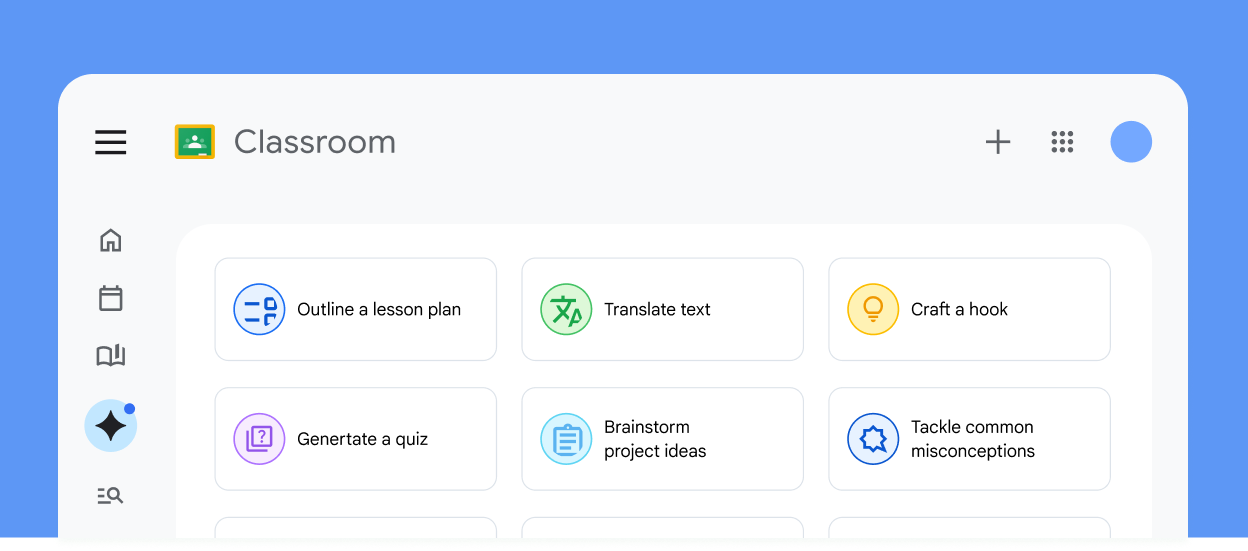
Lesson planning
Draft lesson outlines, objectives and project ideas.
Quizzes and rubrics
Prepare questions and assessment criteria for review.
Adapt learning materials
Adjust reading levels, translate text and create vocabulary lists.
Presentations and visuals
Generate slide drafts and visual teaching aids.
Audio lessons
Turn teaching materials into draft audio learning resources.
Teacher-led learning
Explore guided activities, Gems and notebooks for eligible learners.
Availability depends on your Workspace for Education edition, account eligibility, device and administrator settings. Educators should review AI output before use. Check Google’s current AI feature guide ↗
Google education tools, working together
Build a practical toolkit for teaching, collaboration and school administration.
From setup to confident teaching
Talk to EduTech Sri Lanka about a rollout that fits your institution, staff and learning goals.
Plan and configure
Review your needs, account structure, administrator access and class organisation.
Train your team
Practical sessions on assignments, assessment, collaboration and reviewing AI-generated resources.
Support adoption
Discuss onboarding, troubleshooting and a support arrangement suited to your teaching calendar.
Before you get started
Can you help us set up Google Classroom?
Contact us with your institution type, learner numbers and current Google account setup. We can discuss configuration, staff training and support.
Are all AI features available to every account?
No. Access and specific features depend on eligibility, your Google Workspace for Education edition and administrator controls. We can help you review the options for your institution.
Can we use Google Classroom alongside Moodle?
We can review your teaching workflows and discuss where each platform fits, including account management and how resources will be shared.
Let’s build your digital classroom.
Start with your teaching goals. We’ll help you plan the next step.
Talk to EduTech Sri Lanka ↗